Pro Tools ↔ Reaper.
Both ways. One click.
PT-Reaper Converter moves full mixing sessions between Avid Pro Tools (PTX) and Cockos Reaper (RPP) in either direction. Audio, video, surround panning, automation, routing and tempo all travel together. No Wine. No Pro Tools license. Direction is auto-detected from the file extension.
One-time purchase. No subscription. Reaper extension for in-Reaper PTX import is included in the DMG. User Guide (PDF) · Changelog
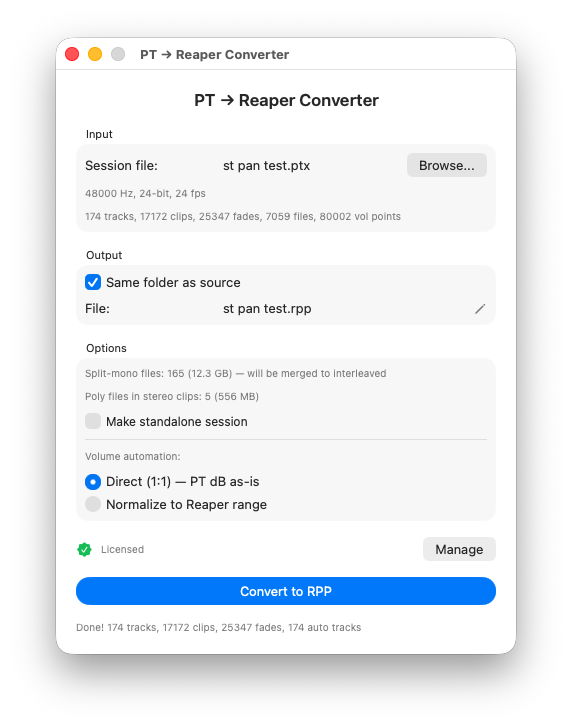
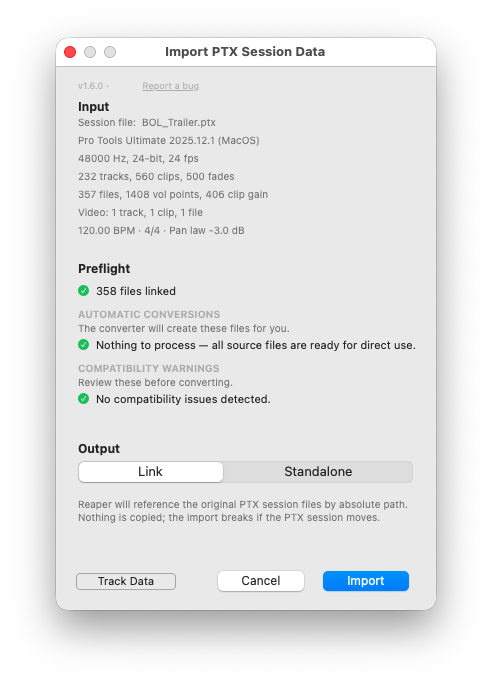
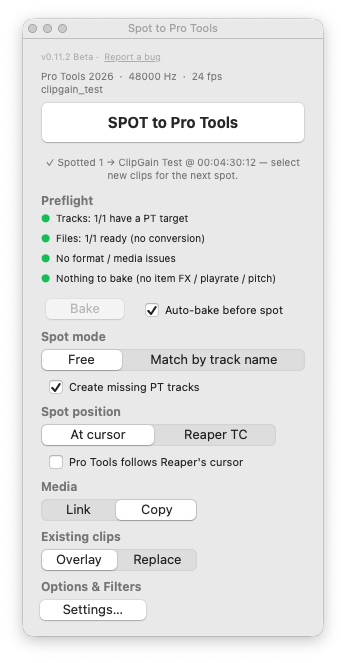
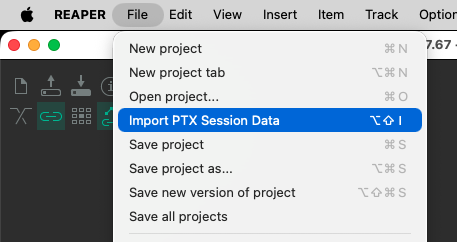
Standalone app and Reaper extension share the same UI — Preflight, Output mode tabs, Track Data filter. Pro Tools ↔ Reaper conversion. Extension shortcut: Option+Shift+I. New "Spot to Pro Tools" extension spots Reaper clips into a running Pro Tools session at timecode.
Two Reaper Extensions Included
The standalone app does the whole conversion on its own. The direct DMG also bundles two optional, independent extensions that live inside Reaper — install whichever fits your workflow, or both. (The Mac App Store build is sandboxed and includes neither.)
Import PTX into Reaper
Open a .ptx straight into Reaper — skip the “export an .rpp from the app, then File → Open” round-trip. Same conversion engine as the standalone app, brought right into your Reaper session.
- Full UI parity — the same Preflight and Output-mode tabs (Link to source / Copy Media) you get in the standalone app, in a dialog inside Reaper.
- Choose exactly what comes in — the Track Data filter (the funnel) toggles automation, playlists, markers, clip gain, colours and more on or off; by default everything is imported.
- Relink built in — if any audio or video moved or is missing, the Preflight’s Relink dialog points it at the right files before import (Match by Name / File-ID / Duration, multi-folder search). The source
.ptxis never modified. - Adds an action — “Import PTX Session Data…” — to Reaper’s Action list: run it once, bind a keystroke (default Option+Shift+I), or add it to the File / Extensions menu yourself.
- The imported session lands in the current Reaper project, ready to play — tracks, routing, automation and media in place.
Spot to Pro Tools
Send the clips you selected in Reaper straight onto a track in a running Pro Tools session — both apps open, no export, no file dialog. Clips arrive carrying their clip gain, volume / pan / surround-panner automation and fades; Pro Tools routing stays untouched.
- Bakes Reaper item FX for you — item / take FX, playrate, pitch-shift, stretch and reverse are rendered into the audio before the spot (non-destructive, undoable). Unique to Spot.
- Spot by track name or free placement; create missing Pro Tools tracks automatically.
- Land clips at the Pro Tools cursor or at their own Reaper timecode to mirror a session.
- Link or copy media; overlay or replace what’s already on the track.
- Live preflight before you commit, and an optional live cursor link (Pro Tools follows Reaper).
- Default shortcut: the
`key. Requires macOS 15 Sequoia.
How It Works
Open
Click Browse and pick a .ptx or .rpp file. The direction is auto-detected from the extension — no Pro Tools or Reaper installation required.
Preflight
Review session stats, format incompatibilities and missing audio. Re-link files in place before converting.
Convert
Click Convert. Open the resulting session in the target DAW — tracks, routing, automation and media land where they should.
What Gets Converted
Both directions are first-class. Tracks, clips, surround panning, automation, routing, video and tempo translate between Pro Tools and Reaper without manual cleanup.
Pro Tools → Reaper (PTX → RPP)
- Tracks, clips, fades & crossfades
- Volume, pan & mute automation
- Playlists → Reaper Lanes (audio & video)
- Video track with clips
- Surround panner up to 7.1.2 → ReaSurroundPan (static positions and full automation)
- Full bus routing (output, input, sends A–J)
- Sub-path buses (5.0, LCR, LFE)
- Folder-based routing with full nesting support
- Clip gain (static and dynamic envelopes)
- Clip colors
- Markers (Memory Locations)
- Tempo map & time signature
- Track colors, notes (SWS), solo & solo safe
- Split-mono to interleaved merge (stereo, 5.1)
- Polyphonic file channel mapping via iXML
- WAV, AIF, RF64 support
Reaper → Pro Tools (RPP → PTX)
- Audio, Folder & Video tracks (sends-receivers become Aux Inputs)
- Clips: position, length, fades, crossfades with shape mapping
- Static and dynamic clip gain
- Clip names, colors and mute state
- Volume, pan & mute track automation
- Surround panning 3.0 / 4.0 / 5.0 / 5.1 / 7.1 / 7.1.2 with full ReaSurroundPan → Pro Tools mapping
- Independent L/R panners for stereo input — front/rear, X/Y, divergence, LFE, center, Side / Size / heights
- Static panner positions and full automation (both directions)
- Folder structure with bus auto-creation, multichannel routing
- Audio pipeline: FLAC / OGG / MP3 → WAV, sample-rate conversion
- Split-mono → interleaved consolidation, optional standalone bundling
- Pro Tools relinks every file correctly across folders
- Video tracks (.mov, .mp4, .avi, .mkv, .m4v, .mxf) — linked by absolute path or copied
- Tempo, time signatures, project markers → Memory Locations
- Track notes, colors, solo state and solo safe
- Preflight report and file relink dialog
Additional features
- Output mode tabs: Link to source or Copy Media (Standalone)
- 22 Track Data toggles — choose exactly what to convert
- Preferences popover — set audio & video folder names per direction
- Preflight report with per-category file lists and total sizes
- Native Relink dialog: Match by Name / File-ID / Duration, multi-folder search
- Folder-based routing with full nesting
- Trim Overlapping Clips toggle (Pro Tools "topmost wins" behavior)
- Two Reaper extensions in the DMG — Import PTX, and Spot to Pro Tools (Beta)
- Update checker and in-app "Report a bug" link
- Reveal in Finder after conversion
- 14,550 clips across 174 tracks convert in ~3.5 seconds
On the roadmap
- RPP → PTX: Sends A–J with automation
- RPP → PTX: Reaper Fixed Item Lanes / Takes → playlists
- RPP → PTX: Master Fader track conversion
- RPP → PTX: Plug-in chains beyond ReaSurroundPan
- Both: MIDI tracks and clips
- Both: Immersive surround beyond 7.1.2 (Dolby Atmos bed, 9.1.6)
- Both: Tick-based / beat-locked tracks (musical timing)
Built for Mac from Day One
Native macOS
No Wine, no CrossOver, no emulation layers. Universal binary — runs natively on Apple Silicon and Intel.
No Pro Tools Required
Reads PTX files directly by parsing the binary format. Works even if you have never installed Pro Tools.
Both Directions, One App
Direction is auto-detected from the file extension. Drop a .ptx in, get a Reaper project; drop a .rpp in, get a Pro Tools session — including audio relinking, video files and surround panning.
Supported Formats
Frequently Asked Questions
One-time purchase. No subscription.
Both directions, all future updates included. Early adopters get the best price.